
Description
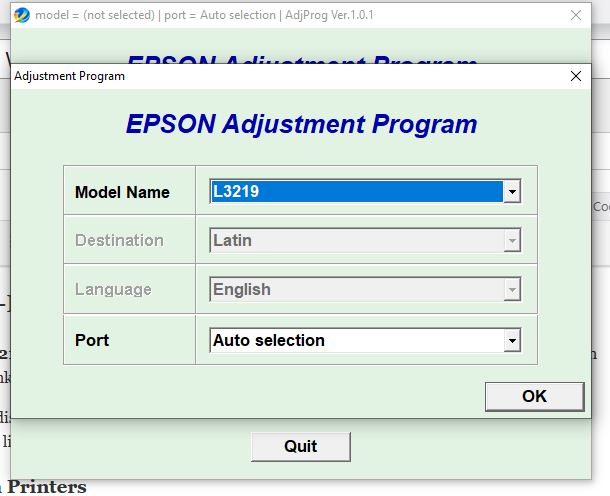
Epson L3200–L3219 Waste Ink Pad Resetter
The Epson L3200–L3219 Resetter is an adjustment utility designed to reset the waste ink pad counter on supported Epson EcoTank printers.
If your Epson printer is displaying a waste ink pad/service required error or the waste ink counter has reached its programmed limit, this utility can be used to initialize the relevant counter.
Compatible Epson Printers
This resetter is compatible with:
- Epson L3200
- Epson L3201
- Epson L3210
- Epson L3211
- Epson L3213
- Epson L3215
- Epson L3216
- Epson L3217
- Epson L3218
- Epson L3219
What’s Included
- Epson adjustment/reset utility
- Waste ink pad counter reset function
- Main pad counter reset
- Platen pad counter reset
How It Works
- Download the resetter utility.
- Extract the downloaded archive.
- Connect the Epson printer to your Windows PC using USB.
- Open the adjustment utility.
- Select Particular Adjustment Mode.
- Select Waste Ink Pad Counter.
- Select the relevant counters.
- Check the current counter values.
- Select Initialize and follow the instructions displayed by the utility.
- Turn the printer off and back on when instructed.
Important
- The printer should be connected to the computer before running the utility.
- Follow the instructions displayed by the adjustment program carefully.
- This utility is intended for the Epson models listed above.
- Resetting the counter does not physically replace or clean the waste ink pads. If the waste ink pads are physically saturated, they should be serviced or replaced by a qualified technician.
- Use the utility at your own discretion and ensure that the selected printer model is supported before proceeding.
Download
Epson Resetter 10.rar
The resetter is provided as a downloadable software utility for the supported Epson models.


Reviews
There are no reviews yet.