
Description
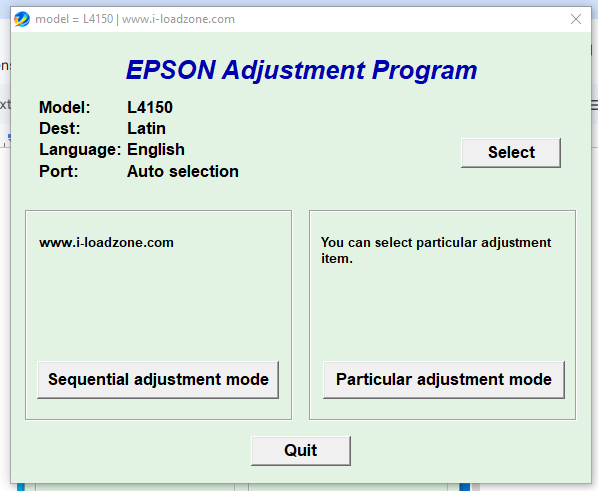
The Epson L4150 Resetter is a specialized adjustment program designed to reset the internal waste ink pad counter in Epson L4150 printers. After extended use, the printer may stop printing and display service-related errors when the internal waste ink counter reaches its preset limit.
This reset tool clears the internal counter and restores the printer to normal working condition, allowing you to continue printing without sending the printer for expensive servicing.
This product is delivered as a PDF file containing a secure download link to the resetter ZIP file. After downloading, you can extract the program, run it on your computer, and follow the instructions to reset the printer.
When Do You Need This Tool?
You may need the Epson L4150 Resetter if your printer shows any of the following problems:
- “Service Required” error message
- “Ink Pad is at the End of Its Service Life” warning
- Printer refuses to print even though ink is available
- Red lights blinking alternately on the printer
- Waste ink counter full message
- Printer becomes locked due to internal maintenance limits
- Epson Status Monitor shows a maintenance or ink pad errorThese issues are common after long-term printer use and do not mean the printer is faulty. They simply indicate that the internal waste ink counter has reached its limit.
How the Reset Works
- Download the PDF file after purchase
- Open the PDF and click the download link
- Download the ZIP resetter file
- Extract the ZIP file to your desktop
- Run the L4150 reset program (AdjProg.exe)
- Follow the instructions inside the software
- Restart the printer to complete the reset
Key Features
- Compatible with Epson L4150 printers
- Resets the waste ink pad counter
- Fixes service required and maintenance errors
- Easy-to-use adjustment program
- Instant digital delivery via PDF download link
- No physical repair required
Important Notes
- This tool performs a software reset only. Cleaning or replacing the physical ink pads is optional but recommended for long-term use.
- Windows PC required to run the reset program.
- USB connection is required (Wi-Fi is not supported for the reset process).
- Follow the instructions carefully to complete the reset successfully.
Link To other Printer resetters


Reviews
There are no reviews yet.